March 7, 2011
Select the following logos from internet:
apple computers logo, starbucks, free logo
  1. Create a new layer
  2. Select the brush tool
  3. Select several colors and paint each logo
  4. Select Filter>Blur>Gaussian Blur
  5. Select Pin light filter from Layers window
  6. Save as, logo1.psd, logo2.psd, logo3.psd in Bimester 4 Folder

February 15,2011

Students will apply the following tools:
Select 3 images of big eyes


  1. Create a new layer

  2. Select the brush tool

  3. Select the brush size

  4. Select the first color you want and repeat this step with several colors until you fill all the eye with circles.

  5. Select Filter>Blur>Gaussian Blur and move the Radius to 16 pixels

  6. Select Overlay in the layers window and the eye will look like a rainbow eye.

  7. Repeat the same steps for 3 eyes and save them as eye1. psd, eye2.psd, eye3.psd in Bimester 4 folder in your documents.

Have a nice class !


January 25, 2011
Students will design an Allegory of the following topics.
* First find out the meaning of allegory
* Topic for allegory one is "your childhood"
* Topic for allegory two is " your teenage"
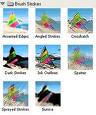
* 3 images in each proyect and apply Filter > Brush strokes
and use one of them in each image
* For allegory 2, use the lasso tool in a small area of the image and apply Filter > Brush stroke just to that area.
* Finally Type a title to your proyect My Childhood for project 1 and My teenage for project 2 and apply Blending option > Inner shadow and Outer Glow move the slide bars to maximize the effect.


Good luck students, you can do it !

This week students will practice the tool clone stamp in photoshop, just follow instructions:

1. Select an image with two ducks in a lake

2.- Make a layer copy with ctrl-j and work in the copy

3.-Select the clone stamp tool

4.- Press the Alt key plus the left button of your mouse in the color area to be copied instead of one duck

5.- and start to remove it

6.- Add a title (Clone stamp tool) and apply blending options

7.- Save the project as clone stamp.psd in BIM 3 folder


Good luck!

This class we will practice how to do a blog step by step, that way each of you will design a user manual to create one in your home.


Good luck everyone!

During these weeks we are going to work with photoshop and the topics will be the following:

1.- Mothers Day (example of mother`s day invitation card in photoshop sent it to moms ) ---->
2.- Promote any sport
3.- Healthy food
4.- Family

The following tools must be used in each image:
Filter-Extract
Edge Highlighter
Fill tool
Eraser
Blur
Edit- free transform
Text (to add a title or information)

About

Mrs. Rossana González Garza